File verification, APK for arm64-v8a, armeabi-v7a, armeabi, x86_64, x86, mips, mips64Signature matches the developer’s certificate
Unmodified file: same certificate as this app’s versions from the official app store, signed by Abiram Kanagaratnam. A signature shows who signed the file, not how the app behaves.
Hi, There you can download APK file "Skin Viewer" for Android free, apk file version is 4.8.1 to download to your android device just click this button. It's easy and warranty. We provide only original apk files. If any of materials on this site violates your rights, report us
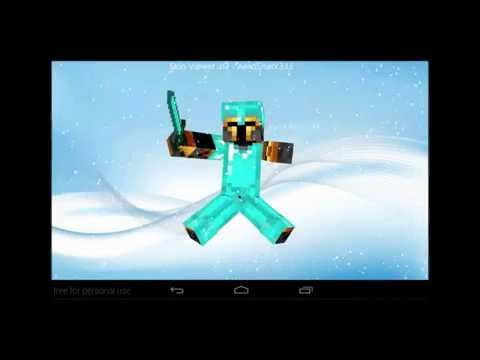
Skin Viewer 3D
A Material-designed application to load, view and apply your Minecraft skin or Minebuilder skin!
Functions:
You can view the skin by using the 'View Skin' button.
You can select a skin using the 'Select Skin' button:
- from Minebuilder Online Skin Database (loginname required)
- from Minecraft Online Skin Database (playername required)
- from URL (URL required)
- from file (some kind of file manager required)
You can select a background from using the 'Select Background' button:
- from URL (URL required)
- from file (some kind of file manager required)
You can use your skin using the 'Use Skin' button:
- to Download the skin to storage
- to apply the skin to Minebuilder singleplayer.
- to apply the skin to Minebuilder multiplayer.
- to apply the skin to Minecraft PC multiplayer.
- to apply the skin to Minecraft Pocket Edition singleplayer/multiplayer.
Watch an app preview here: https://www.youtube.com/watch?v=hvKMgMEy2k8
Controls:
On the main screen:
- Press a button and you will see its functions
- There is a menu too
In SkinViewer mode:
- Tap (holding tap): Skin stops rotating
- Left and right swipe: Rotate skin in swipe-direction (and keep rotating in that direction when the finger is removed from the screen)
- Swipe, when an arm or leg is touched: rotating body part
- Double tap to show menu (for extra features)
-- Menu:
--- Show snow
--- Show rain
--- Clear weather
--- Slanted arms/legs
--- Zoom
--- Show/hide parts
--- Save screenshot
--- Enable/Disable auto-rotation
--- Close menu
Live Wallpaper:
- A 3D live wallpaper (skin viewer)!
- Double tap to show/clear snow or rain
- Swipe to change rotation direction
- For custom skins and backgrounds:
-- skin: place a skin.png file in /*storage*/SkinViewer
-- background: place a background.png file in /*storage*/SkinViewer
(*storage* is usually the SD-card)
-- or use the in-app Navigation Drawer to change both skin and background!
Supports:
Minecraft (normal skin version and 1.8 skin version) and Minebuilder skins are both supported!
Minebuilder: https://www.space-walrus.com/games/Minebuilder/get/android
Minecraft: https://minecraft.net/pocket
Permissions used:
Internet & Wifi - Advertentions and obtaining skins and/or backgrounds
Read & Write - Loading, saving and applying skins and/or backgrounds
Libraries used:
JPCT-AE: http://www.jpct.net/
ZipI/O: Kellinwood
ZipSigner: Kellinwood
ZipLogger (x2): Kellinwood
Notes:
Minecraft is a trademark of Mojang AB. I am not affiliated with Mojang AB but I adhere to the terms set out by Mojang AB at
https://www.minecraft.net/terms
Minebuilder is a trademark of Space Walrus. I am not affiliated with Space Walrus but I adhere to the terms set out by Space Walrus at
https://www.space-walrus.com/terms
Explore the version history of Skin Viewer 3D for Android and see how the app has evolved over time. This section tracks versions added to the apk.cafe catalog, including download size, declared permissions, and Android compatibility. Select a point on a chart to explore historical version data.
1 new Skin Viewer 3D version was added to the apk.cafe catalog in 2018. The catalog contains 2 versions dating back to July 2017.
The Skin Viewer 3D download size for most phones has stayed at about 4.26 MB since version 4.8 (2017).
Skin Viewer 3D has declared 7 permissions since 2017 (version 4.8).
Skin Viewer 3D 4.8.1 requires Android 2.1 or newer and is built for Android 6.0.
Older versions of Skin Viewer 3D. The apk.cafe catalog has 2 versions of Skin Viewer 3D, from 4.8 (Jul 2017) to Skin Viewer 3D 4.8.1 (Aug 2, 2018). If the latest version has a bug, changed something you rely on or does not work on your phone, you can install an earlier one from the list of older Skin Viewer 3D APK versions below.
Android does not install an older version over a newer one, so uninstall Skin Viewer 3D first. This usually deletes the app's data on the phone, so back up anything you need.
Dates show when each version was added to the apk.cafe catalog. Size is the full download for most phones; permissions are for the same build.
